SecureStepPartner OT/ICS
# Empowering Distributed Manufacturing with Azure Local
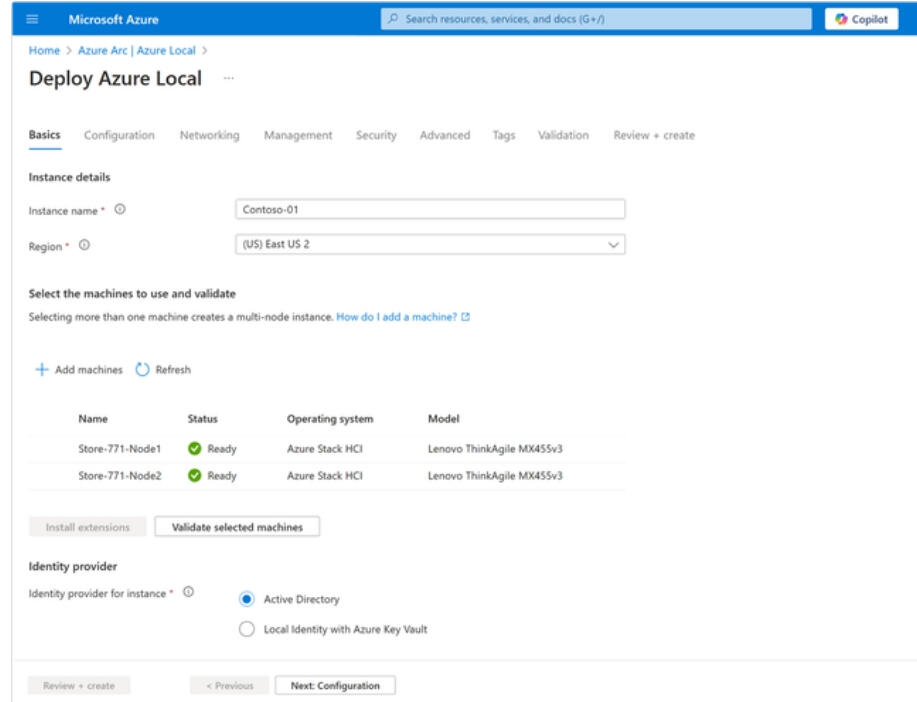
Operate and scale with the power of the cloud
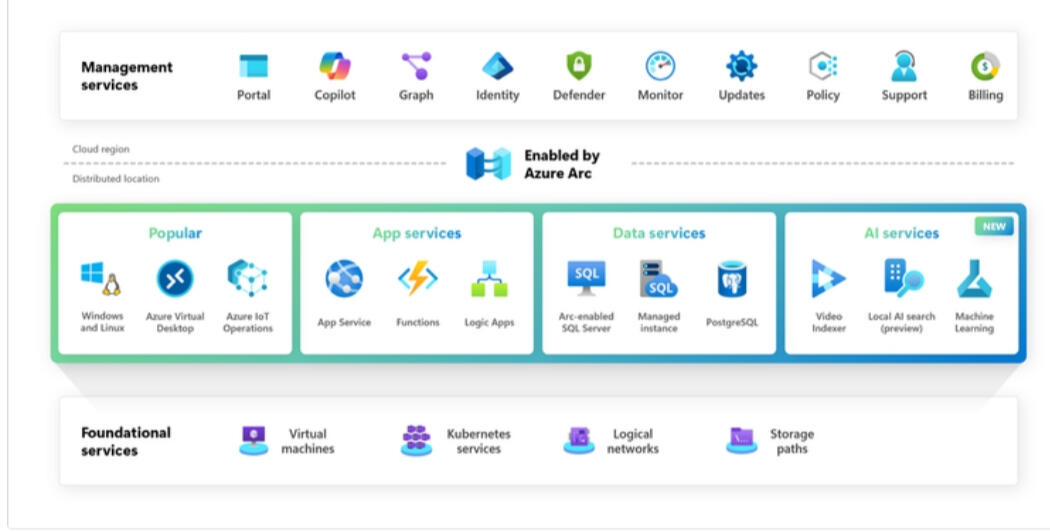
"Azure Local empowers you to manage physical machines as seamlessly as cloud resources. Using the Azure portal and APIs, you can perform lifecycle operations such as deployment, configuration, updates, and monitoring. By eliminating the need for separate on-site management tools, Azure Local provides a unified approach to managing cloud and distributed resources. This centralizes oversight, reduces reliance on local personnel, and drives cost efficiencies."
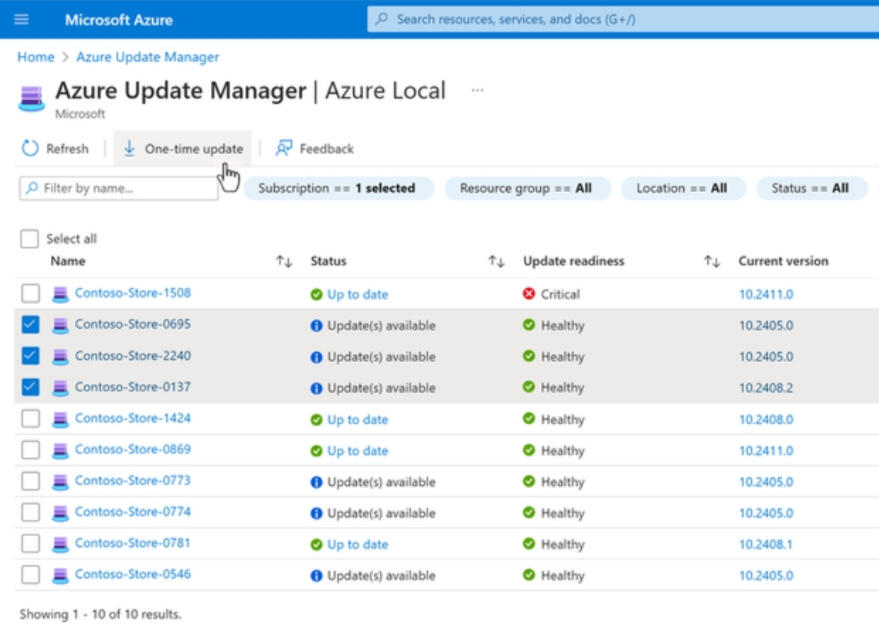
Uniform Deployments with Infrastructure-as-Code
"Scaling with Azure Local is simple and consistent. Using Azure Resource Manager (ARM) templates, you can define your configuration once and reuse it across multiple locations, customizing unique parameters for each site. This infrastructure-as-code approach ensures uniform deployments, reduces manual effort, and streamlines scaling for distributed environments."
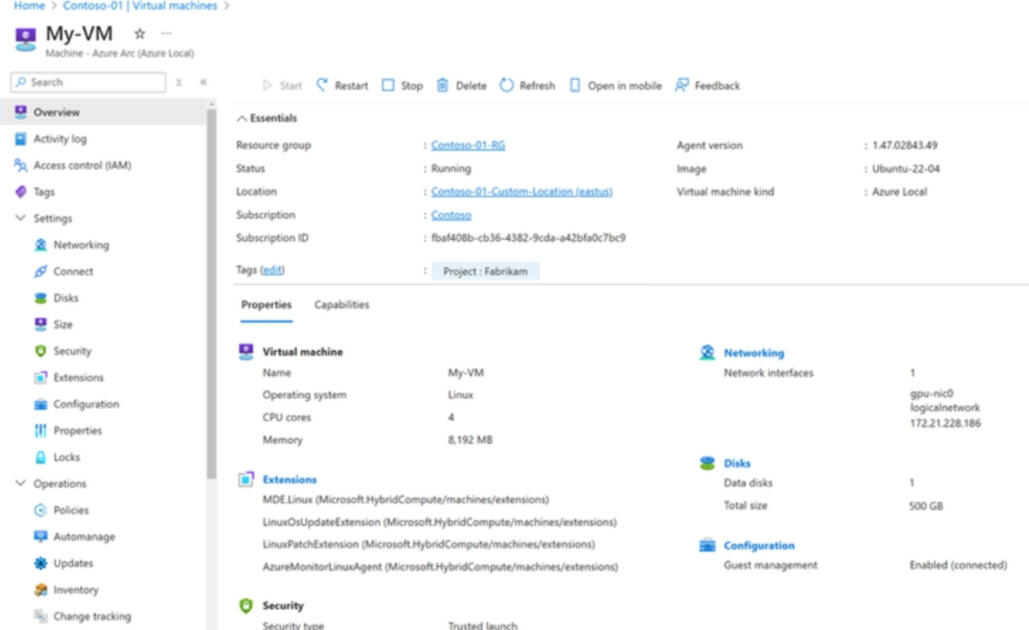
One-click infrastructure compliance
"Azure Local simplifies updates with a single monthly package that includes the entire infrastructure software stack, plus OEM content like drivers and firmware for 3rd party solutions. Follow the OEM update schedule for specific containers. Manage all your Azure Local updates easily in Azure Update Manager, right alongside your other cloud resources."
Ready for all your apps: VMs and containers alike
"Azure Local supports critical workloads with general-purpose VMs that offer flexible sizing and configuration options, ensuring they meet your application requirements effectively."
Azure Local for Manufacturing: Use Cases, Risks and Lessons From Production
Manufacturing has a strange infrastructure problem.
The larger the company gets, the more every plant starts becoming its own little data center.
One facility has VMware. Another has Hyper-V. An acquisition comes in with physical servers that nobody wants to touch. Another plant has a virtualization cluster installed six years ago by someone who no longer works there.
All of them support production.
All of them are slightly different.
And eventually a centralized IT team is expected to manage the whole thing.A manufacturer with 30 plants should know what plant 31 will look like before it is built or acquired.
That is where Azure Local becomes interesting.
Azure Local brings Azure-managed infrastructure into a company's own facilities. Compute and storage remain close to the workloads that need them, while Azure and Azure Arc provide a common management model.
For manufacturing, the potential benefit isn't simply "Azure on-premises." It's standardization across distributed sites.The Business Problem Is Bigger Than Virtualization
For a manufacturer with 20 or 30 facilities, the cost isn't just servers and virtualization licenses.
The larger cost comes from supporting 20 or 30 different ways of doing the same thing.
Different hardware.
Different backup systems.
Different network designs.
Different administrative practices.
Different patch levels.
Different security controls.
Different recovery procedures.
Then an acquisition adds five more plants.
This creates more than an IT problem.
It affects:
• M&A integration time
• Plant downtime risk
• Cybersecurity exposure
• Infrastructure lifecycle costs
• Audit readiness
• Disaster recovery
• The ability to support remote facilities
• The amount of institutional knowledge tied to individual employees
The real opportunity with Azure Local is creating a repeatable infrastructure pattern that can be deployed across those locations.Why Production Still Needs Local Infrastructure
Cloud-first architecture works for a lot of enterprise applications.
Production is different.
A factory may depend on:
• MES applications
• Industrial historians
• Engineering systems
• Machine vision
• Quality systems
• Local databases
• OT monitoring platforms
• Jump servers
• Edge analytics
• AI inference
Some of those workloads need low latency.
Some generate too much data to continuously send elsewhere.
Others simply need to keep operating when connectivity outside the plant is degraded.
Local infrastructure isn't going away.
The question is whether local infrastructure also has to meanisolated and inconsistent infrastructureWhere Azure Local Can Work Well
There are production environments where the architecture makes sense.Enterprise infrastructure field report: One organization deployed a small Azure Local cluster specifically to keep an ERP-connected virtual desktop workload physically close to its SQL database. After roughly a year in operation, the team reported no significant issues and continued applying monthly updates.
That's a reasonable use case.
There was a specific reason for keeping the workload local.
The organization already had Azure expertise.
The workload benefited from proximity to an on-premises application.
And the infrastructure wasn't being deployed simply because someone wanted to replace VMware with another hypervisor.
Another infrastructure team operating Azure Local across multiple locations reported that later deployments had been solid after bringing in vendor assistance for initial implementation. Earlier sites had experienced more update and firmware problems, while newer deployments benefited from a more mature release.That points to an important lesson:
Azure Local can work well, but deployment maturity and operational experience matter.
This is infrastructure that should be engineered and piloted, not treated like an appliance that gets plugged into a rack Friday afternoon.Where Teams Get Into Trouble
The other side of the story is harder to ignore.
Recent infrastructure teams evaluating Azure Local repeatedly describe the same categories of problems:
• Complicated initial deployment
• Difficult upgrades
• Vendor support handoffs
• Hardware and firmware dependencies
• Troubleshooting across multiple technology layers
• Changes to deployment and management tooling
• A larger learning curve than expected
One organization spent more than a year testing Azure Local as a VMware replacement before ultimately moving back to a different virtualization platform.
Another team described the cluster itself becoming stable after deployment, but said getting to that point was considerably harder than expected.
That distinction matters.Day-one deployment isn't the real test. Day-500 operations are.
A proof of concept that successfully creates three virtual machines doesn't tell you enough.
Test upgrades.
Test failed hardware.
Test monitoring.
Test backup restoration.
Test vendor support.
Test what happens when a node needs to be rebuilt.
Then decide whether you want that platform underneath production.A Manufacturing Failure Mode Worth Paying Attention To
One industrial Azure Local deployment provides a particularly useful example.
The organization was using certified enterprise hardware and had reached the point where virtual machines could be installed.
The cluster appeared generally functional.
But the team found intermittent packet loss between cluster nodes.
It wasn't enough to make everything obviously fail.
Most systems remained accessible.
Their OT application was different.
It depended on Microsoft Message Queuing and reacted badly to even brief packet loss.
The infrastructure looked mostly healthy.
The production application did not.
The environment couldn't be moved into production.Infrastructure health and production health are not always the same thing.
This is why OT acceptance testing has to go beyond checking whether the VM is running.
Test the actual historian.
Test MES transactions.
Test machine communications.
Test message queues.
Test engineering access.
Test the weird twenty-year-old application everyone forgot was business-critical.
The application decides whether the infrastructure works, not the dashboard.Know Who Owns the Problem Before Production Does
That same industrial deployment exposed another common enterprise infrastructure problem.
The hardware manufacturer was involved.
Microsoft was involved.
Network configuration had been reviewed.
The issue crossed several layers of the stack.
And troubleshooting became a handoff between vendors.Industrial deployment lesson: When compute, storage, networking, firmware and cloud management are tightly integrated, ownership of a failure can become less obvious.
Before purchasing the platform, ask some uncomfortable questions.
Who owns a cluster networking problem?
Who owns firmware?
Who handles storage failures?
Who coordinates a Microsoft escalation?
Who replaces a failed NIC?
Who validates switch configuration?
Who owns the problem when two vendors disagree?
In an office environment, vendor ping-pong is frustrating.
When the workload supports production, it can become expensive.Do Not Combine Two Major Migrations Without a Reason
A particularly useful piece of infrastructure feedback was simple:
Don't make a VMware exit and an Azure Local learning curve the same project unless you have a reason to.
That is good advice.
If the business objective is simply escaping VMware licensing, there are several alternatives.
Azure Local should win because the architecture makes sense, not because it happens to be another Microsoft product.
Pilot one boring workload first.
Run it for a while.
Upgrade it.
Break something.
Recover it.
Open a support case.
Live with the platform.
Then consider putting production on it.What Happens When the Internet Goes Down?
This question deserves more nuance than it used to.
For a standard cloud-connected Azure Local deployment, Microsoft says temporary loss of Azure connectivity does not stop the host infrastructure or currently running VMs.
Existing workloads continue operating.
If the environment doesn't successfully sync with Azure for 30 consecutive days, it enters a reduced-functionality state. Existing VMs continue running, but new VMs cannot be created until connectivity and synchronization are restored.
Microsoft also now offers Azure Local Disconnected Operations, which moves the control plane on-premises for environments that need to operate without a connection to the Azure public cloud.
That is potentially important for manufacturing sites with connectivity, sovereignty or operational requirements that make permanent cloud dependence undesirable.
But don't simply read the documentation and check the box.
Test your architecture.
Disconnect the upstream connection during the pilot.
What keeps running?
What can administrators still manage?
Can production users authenticate?
Can emergency administrators gain access?
What happens to monitoring?
What happens to backups?
What happens after several hours?
What happens after several days?
What happens when connectivity returns?Don't ask whether the plant can operate through a connectivity failure. Prove it.
Cybersecurity Is Where Standardization Gets More Interesting
Azure Local includes a substantial security baseline.
Microsoft documents more than 300 security settings enabled by default, along with capabilities including Application Control, BitLocker encryption, security baseline management, drift control and Defender integration.
Those controls are useful.
But the bigger security benefit for a manufacturer may simply be consistency.
Instead of 30 plants with 30 security baselines, organizations can start defining one expected architecture.
How are administrators authenticated?
Where are logs sent?
How are servers encrypted?
How are configurations monitored?
How are workloads backed up?
How are vulnerabilities handled?
How are failed systems rebuilt?
What is normal?
Consistency makes abnormal behavior easier to identify.Azure Local Does Not Make a Plant ISA/IEC 62443 Compliant
This is where technology marketing sometimes gets carried away.
ISA/IEC 62443 isn't a virtualization standard.
A secure hypervisor doesn't compensate for a flat plant network.
Encryption doesn't fix shared administrator credentials.
Azure Arc doesn't fix an undocumented vendor VPN directly into the controls network.
A manufacturing cybersecurity program still has to address:
• Asset inventory
• Zones and conduits
• Network segmentation
• Identity
• Privileged access
• Secure remote access
• Engineering workstations
• Vendors
• Firewalls
• Vulnerability management
• Logging and monitoring
• Backup and recovery
• Change management
• PLCs and industrial controllers
• Governance and procedures
Azure Local can provide a more standardized infrastructure foundation for an ISA/IEC 62443-aligned architecture.
It does not replace that architecture.Segmentation Can Be Too Little — or Too Much
A plant network field report described a facility where several networks had been placed on the same physical infrastructure with little separation.
Over years of expansion, networks became crowded, loops accumulated, old connections remained in place and outages became more likely.
The organization eventually started rebuilding around a more structured OT network with redundant routing and defined VLANs.
That's one extreme.
Another industrial example came from a bottling facility that had gone in the opposite direction.
The environment contained more than 40 VLANs, including separate VLANs for very small machine cells.
It looked highly segmented on paper.
Operationally, it had become difficult enough that controls personnel couldn't connect to equipment without involving IT.
Both environments had security problems.
One didn't have enough architecture.
The other had architecture without enough consideration for operations.
The goal isn't more VLANs. The goal is defensible communication paths that production teams can actually operate.The IT and OT Boundary Still Matters
A useful starting point for many manufacturers is creating a clear boundary between enterprise IT and industrial systems.
From there, additional segmentation should reflect actual communication requirements and risk.
A simplified architecture might look like:
Enterprise IT
↓
Industrial DMZ
↓
Manufacturing Operations
↓
Cell / Area Zones
↓
PLCs, Drives and Industrial Equipment
Azure Local can support workloads within that architecture.
It should not erase the boundaries around them.
Where M&A Changes the Math
Acquisitions are one of the strongest arguments for having a manufacturing infrastructure standard.
Anyone who has assessed acquired facilities knows what tends to appear.
Old servers.
Unsupported operating systems.
Flat networks.
Shared administrator credentials.
Vendor VPNs.
Unknown switches.
Unmanaged firewalls.
Backups nobody has restored.
Equipment that is somehow production-critical despite nobody knowing who owns it.
A spreadsheet that is supposedly the asset inventory.
Maintaining every acquisition exactly as it was inherited doesn't scale.
A better question is:
What does this facility need to become?
Define the destination.
Compute.
Networking.
Segmentation.
Identity.
Remote access.
Logging.
Backup.
Recovery.
Monitoring.
Cybersecurity.
Then an acquisition becomes a transition toward a known architecture rather than another permanent exception.Edge AI Strengthens the Case for Local Compute
Manufacturing AI also makes the local infrastructure question more important.
Machine vision.
Predictive maintenance.
Equipment anomaly detection.
Quality inspection.
Process optimization.
Sensor analysis.
Industrial copilots.
Some workloads belong in a cloud region.
Others may produce too much data, require too little latency or interact too closely with production to make that practical.
The better architecture isn't necessarily cloud or on-premises.
It's:
Run the workload where it makes operational sense, then manage the environment consistently.
That is where Azure Local's model starts becoming much more interesting.Where Azure Local Looks Strong
Azure Local deserves serious consideration when the manufacturer has:
• Multiple distributed facilities
• Significant Azure investment
• Local production workloads
• Limited IT resources at individual plants
• A need for standardized infrastructure
• M&A integration challenges
• Edge or AI workloads
• Centralized governance requirements
• A legitimate reason to extend Azure management into the plant
Where We Would Be More Cautious
Take a harder look when:
• The facility only needs a handful of basic VMs
• The primary objective is simply replacing VMware
• The organization expects appliance-like simplicity
• Local infrastructure expertise is limited
• Vendor support responsibilities aren't clearly defined
• The production application is highly sensitive to infrastructure interruptions
• The environment hasn't been tested under failed connectivity
• There is no real benefit from Azure integration
Sometimes standard Hyper-V, Nutanix, VMware, Proxmox or another architecture will make more sense.
The platform should follow the operational requirement.
Not the other way around.The Most Important Lesson
The most interesting part of Azure Local isn't really Azure Local.
It's standardization.
A manufacturer with 30 plants should know what plant 31 will look like before it is built or acquired.
That means knowing the expected infrastructure architecture before another site gets added.
How compute is deployed.
How the network is segmented.
How administrators connect.
How vendors connect.
Where logs go.
How systems are backed up.
How production survives an outage.
How security is monitored.
How failed infrastructure gets replaced.
Those things should become predictable.
Azure Local can be one way to get there.
It shouldn't be confused with the strategy itself.Before Standardizing the Platform, Standardize the Architecture
A manufacturing infrastructure modernization project should start by understanding what is already deployed.
Assets.
Critical production d